

The Ultimate Guide to Zapier AI: How to Build an Autonomous Business in 2026

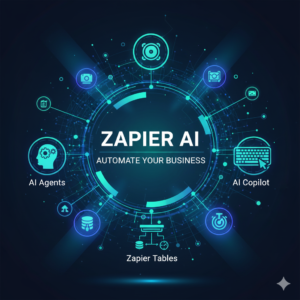
In today’s fast-paced business world, efficiency is no longer a luxury—it’s a necessity. Small to medium business owners and solopreneurs often feel overwhelmed. They struggle with endless tasks, leading to burnout and stagnant growth. Fortunately, Zapier has evolved beyond simple automation. In 2026, Zapier AI offers powerful new tools to create an autonomous business. This guide will explore how Zapier AI Agents, Copilot, and Tables can transform your operations.
Understanding Zapier’s AI Evolution
Zapier revolutionized automation by connecting thousands of apps. However, the new era of Zapier AI brings “AI Orchestration” to the forefront. This means AI tools work together, learning and adapting to your business needs. They reduce manual effort and free you to focus on strategic growth. This comprehensive suite now allows businesses to build intelligent, self-managing workflows. Therefore, you can scale operations without increasing your headcount.
Zapier Central: Your New AI Teammates
Problem: You need dedicated team members for repetitive, complex tasks. However, hiring and training are expensive and time-consuming.

Solution: Zapier Central allows you to build AI Agents that act as your digital teammates. These agents possess long-term memory. They learn from past interactions and adapt to new information. Furthermore, they can autonomously work across Zapier’s 8,000+ app integrations. This means your AI Agents can handle tasks from lead generation to customer support.
Imagine an AI Agent dedicated to customer follow-ups. It can respond to inquiries, update your CRM, and even schedule meetings. This frees up human staff for more critical, personal interactions. Consequently, your operational efficiency soars. In fact, these agents can process information, make decisions, and execute actions independently. This truly revolutionizes how small businesses manage their daily operations.
AI Copilot: Text-to-Automation Power
Problem: Building complex automation workflows often requires technical knowledge. You might struggle to translate your ideas into actionable Zaps.
Solution: Zapier’s AI Copilot introduces a natural language, text-to-automation builder. You simply describe the workflow you need in plain English. Copilot then generates the Zap for you. This feature is a game-changer for non-technical users. It democratizes access to advanced automation.
For instance, you could tell Copilot: “When a new lead fills out my Typeform, add them to HubSpot, send a personalized welcome email from Gmail, and create a follow-up task in Asana.” Copilot instantly drafts the Zap. You can then review and activate it. This intuitive interface speeds up workflow creation dramatically. Therefore, it enables rapid prototyping and deployment of new automations. It is like having an expert automation developer at your fingertips, constantly building new efficiencies.
Zapier AI Tables: The Brain of Your Autonomous Business
Problem: Your AI agents and workflows need a centralized, dynamic database for information. Spreadsheets often become siloed and hard to manage.
Solution: Zapier Tables serve as the crucial “brain” for your AI orchestration. It is a powerful, no-code database that stores and organizes all your business data. This centralized hub feeds information to your AI Agents and Zaps. It allows them to make informed decisions and execute tasks effectively.
Tables can store customer data, product inventories, content ideas, or project statuses. When an AI Agent needs specific information, it queries the Table. This ensures data consistency and accuracy across all your automated processes. Furthermore, changes in Tables can trigger Zaps, initiating new workflows. This seamless integration makes Tables indispensable for any autonomous system. In fact, it replaces scattered spreadsheets with a single, intelligent data source. Consequently, your data-driven automations become far more reliable and powerful.
AI Chatbots: Intelligent Customer Interaction
Problem: Providing 24/7 customer support and lead qualification requires significant human resources. This can be costly for growing businesses.
Solution: Zapier AI allows you to deploy custom-trained AI Chatbots directly on your website. These bots can be trained on your specific business knowledge base. They handle common customer inquiries, qualify leads, and provide instant support. This capability enhances customer experience and streamlines your sales funnel.
These chatbots can answer FAQs, guide users through your services, or even book appointments. They integrate with Zapier’s ecosystem. Therefore, they can push qualified leads directly into your CRM or initiate follow-up Zaps. This reduces the burden on your support team significantly. In fact, custom chatbots provide immediate responses, improving user satisfaction. Consequently, your business can operate around the clock, capturing opportunities even after hours.
Practical Use Case: Automating Content Repurposing with Zapier AI
Let’s illustrate the power of Zapier AI with a real-world example: Automated Content Repurposing.
Scenario: You produce a weekly YouTube video and want to automatically turn it into a blog post, then create social media snippets.
- Trigger: A new YouTube video is published.
- Zapier Central (AI Agent):
- An AI Agent listens for new YouTube videos.
- It uses a transcription service (connected via Zapier) to get the video transcript.
- The AI Agent then processes the transcript, identifies key points, and drafts a full blog post using an AI writing tool (e.g., OpenAI’s GPT) integrated via Zapier.
- It saves the draft blog post into Zapier Tables for review. This is where “human-in-the-loop” approval comes in.
- Zapier Tables (Review & Storage):
- The drafted blog post appears in a “Content Pipeline” Table.
- A human editor reviews the draft, makes any necessary edits, and marks it as “Approved.”
- Zapier Central (AI Agent – Phase 2):
- Once “Approved” in Zapier Tables, the AI Agent publishes the blog post to your WordPress site.
- Simultaneously, the AI Agent extracts 3-5 key quotes or summaries from the approved blog post.
- It then generates optimized captions and hashtags for different social media platforms (LinkedIn, X/Twitter, Facebook).
- Zapier Copilot (Social Media Scheduling):
- The AI Agent hands over the social media snippets to AI Copilot.
- Copilot automatically schedules these posts on your social media accounts through integrated apps like Buffer or Hootsuite.
This autonomous workflow dramatically reduces the time and effort needed for content repurposing. It ensures your valuable content reaches multiple audiences consistently. This is the essence of AI orchestration: intelligent systems working together seamlessly.
The Future is Autonomous
Zapier AI’s new suite of tools—AI Agents, Copilot, and Tables—represents a significant leap forward in business automation. They empower businesses to build truly autonomous operations. By leveraging these powerful, no-code AI tools, you can streamline workflows, reduce operational costs, and unlock new levels of productivity. Zapier is no longer just connecting apps; it’s orchestrating an intelligent, self-managing business future. This automated workflow frees you to innovate. Consequently, your business can thrive in the competitive landscape of 2026 and beyond.
Frequently Asked Questions
- Is Zapier AI free to use?
Zapier offers a free tier for basic features but AI tools require a paid plan.
Do I need to know coding?No, Zapier AI uses natural language so you can build tools by just typing.
- What is Zapier Central?
It is a workspace where you create AI agents that work across your favorite apps.
Can AI agents remember my data?Yes, these agents have long-term memory to provide personalized help for your business.
- Is my business data secure?
Zapier maintains high security standards to protect all information stored in Tables and Central.
- How many apps can I connect?
You can connect to over 8,000 different applications through the Zapier ecosystem today.
Read Our other Articles on AI office Automation Tools
Microsoft 365 Copilot: AI Assistant for Modern Work
Google Workspace Studio: Build Apps & Automate Workflows