
Master Advanced Web Design: Tools, Techniques & Best Practices
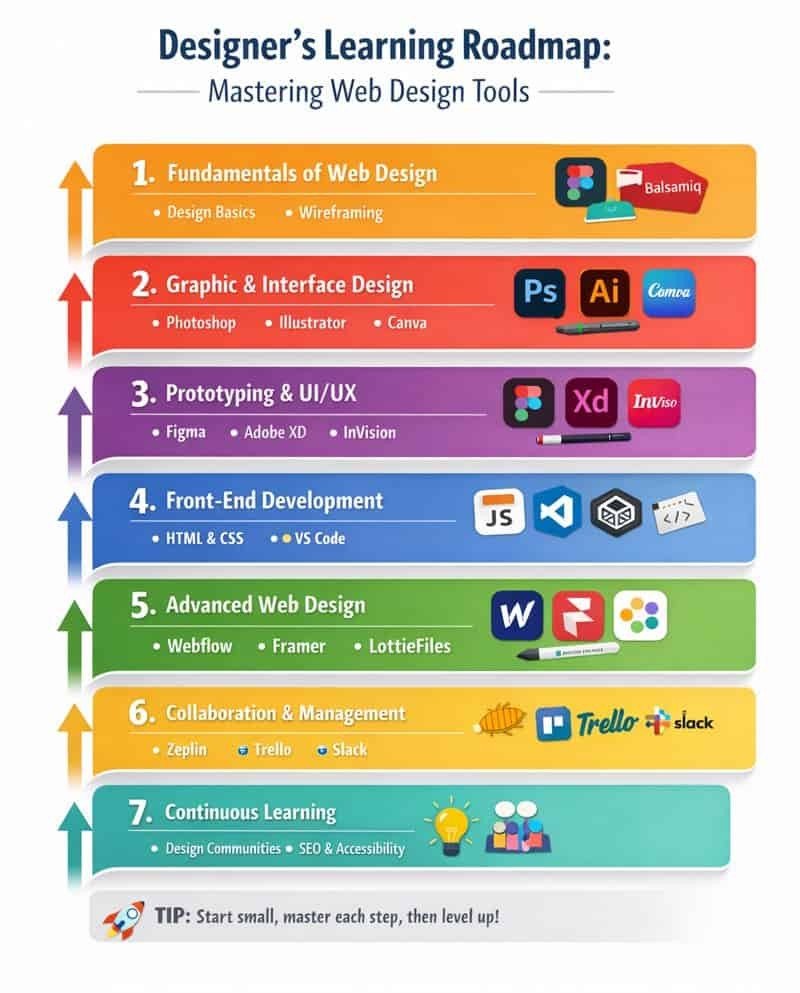
Fundamentals of Web Design
Skills to Learn:
- Design principles (color theory, typography, layout, spacing)
- UI/UX basics
- Web design terminology
- Wireframing & prototyping concepts
Tools to Explore:
- Pen & paper (for sketches)
- Figma (beginner-friendly wireframes)
- Balsamiq (simple wireframing)
- Simple tools: Canva, Figma
- Goal: Make basic social media graphics, banners, and wireframes
Practice Projects:
- Instagram post design
- YouTube thumbnail
- Blog banner image
- Photo retouching
1–2 hours per day → 1–2 months
Level Up Your Design Skills: Intermediate Web Design Journey
Graphic & Interface Design Tools
Skills to Learn:
- Creating mockups and UI components
- Image editing and optimization
- Vector graphics
Tools to Master:
- Adobe Photoshop – photo editing, web graphics
- Adobe Illustrator – vector design, icons, logos
- Canva – quick design mockups
- Figma / Sketch – UI design, prototyping
- Goal: Be able to create professional-looking posters, web graphics, and icons
Practice Projects:
- Logo design
- Icon set
- Business card
- Simple illustration
2–3 hours per day → 2–4 months
Advanced Web Design Roadmap: Tools, Techniques & Best Practices
Prototyping & UI/UX Design
Skills to Learn:
- Interactive prototypes
- User flows & navigation design
- Responsive design & design systems
- HTML, CSS, and basic JavaScript
- Responsive design with media queries
Tools to Master:
- Figma (prototyping, collaboration)
- Adobe XD (interactive UI prototypes)
- InVision (clickable prototypes)
- Goal: Design complete website/app interfaces
- CSS frameworks like Bootstrap or Tailwind
- Chrome DevTools (inspect & debug)
- VS Code (code editor)
- CodePen / JSFiddle (practice environment)
Practice Projects:
- Mobile app UI
- Website landing page
- Dashboard UI
2–3 hours per day → 3–6 months of front-end development basics
Advanced Web Design Tools for Professional Designers
Skills to Learn:
- Animation and motion design
- Design system creation
- Advanced layout & accessibility
Tools to Master:
- Webflow (no-code visual web design & CMS)
- Framer (interactive animations & prototypes)
- LottieFiles (animations for web & apps)
Practice Projects:
- Personal portfolio website
- Business website
- Landing page for product/service
👉 Outcome: Live website creation skills (no coding)
| Goal | Tools Needed |
| Graphic Designer | Photoshop + Illustrator |
| UI/UX Designer | Sketch / Figma |
| Web Designer | Elementor + Photoshop |
| Freelancer | All above |
Supercharge Your Learning: Master Skills Beyond Basics
- Basic HTML & CSS (helpful)
- SEO basics
- Client communication
- Freelancing platforms (Fiverr, Upwork)
Key Insight to Keep in Mind Before Your Next Step
Create real projects, redesign famous websites, and post on Behance/Dribbble.
“Learn web design today, create the digital world tomorrow.”
Visit our other blogs
Ultimate Guide to Web Design Tools for Designers
Best Free SEO Tools for Beginners and Small Business Websites
Best Skills to Learn in 2026 for Students
Best Skills to Learn in 2026 for IT Students
Buy on Amazon